本文简要介绍如何在Android中进行BLE device的Connect,实验平台Android 7, 编译SDK 28(android 9).
本文说明在Android BLE Scan scan到device后继续进行connect
概念简介 链接到标题
GAP 链接到标题
GAP用于连接,并定义了连接的Role
- Central:连接发起者, 主动请求数据
- Peripheral:被连接者,响应Central请求
GATT 链接到标题
连接完成后通过GATT传输数据, Central叫做GATT Client, Peripheral叫做GATT Server。 基于GATT上有很多GATT profiles/service,用于定义传输数据(可读可写)。
Service 链接到标题
一个GATT Server可以提供多个Service,一个Service提供一类属性的服务,由多个Characteristic组成,每个service由UUID区分,例如: 一个BLE device要向外提供自己的电量和测得的环境信息,那么它需要提供两个service
- ESS: 环境传感服务, 提供环境数据,UUID为0x181a
- BAS: 电池服务, 提供电池数据,UUID为0x180f
Characteristic 链接到标题
一组Characteristic组成一个Service,一个Characteristic提供一种属性值,由多个Descriptor组成,每个Characteristicservice由UUID区分,例如: 一个ESS Service向外提供温度和湿度信息
- TEMPERATURE: 温度,UUID为0x2a6e
- HUMIDITY: 湿度,UUID为0x2a6f
Descriptor 链接到标题
一组Descriptor组成一个Characteristic,一个Descriptor提供Characteristic某一方面的描述,每个Descriptor提由UUID区分,例如: 一个TEMPERATURE Characteristic包含了:测量值,温度有效范围,传感器名称,配置等等:
- ES_MEASUREMENT:测量值, UUID为0x290C
- GATT_CUD:传感器名称, UUID为0x2901
- VALID_RANGE:有效值范围, UUID为0x2906
- GATT_CCC:配置, UUID为0x2902
连接 链接到标题
GATT连接 链接到标题
private BluetoothDevice mSelDev;
private BluetoothGatt mGatt;
mSelDev = mDeviceList[i];
mGatt = mSelDev.connectGatt(MainActivity.this, false, mGattCallback);
连接回调 链接到标题
connectGatt只是启动连接,连接成功后要先启动服务发现,然后在回调中获取被连接器件提供的GATT service
private BluetoothGattCallback mGattCallback;
private List<BluetoothGattService> mServiceList;

mGattCallback = new BluetoothGattCallback() {
    @Override
    public void onConnectionStateChange(BluetoothGatt gatt, int status, int newState) {
        super.onConnectionStateChange(gatt, status, newState);
        if (newState == BluetoothProfile.STATE_CONNECTED) {
            //回调中发现已连接,进行service discover,当有discover到service后会回调onServicesDiscovered
            gatt.discoverServices();
        }
    }

    @Override
    public void onCharacteristicWrite(BluetoothGatt gatt, BluetoothGattCharacteristic characteristic, int status) {
        super.onCharacteristicWrite(gatt, characteristic, status);
    }

    @Override
    public void onCharacteristicRead(BluetoothGatt gatt, BluetoothGattCharacteristic characteristic, int status) {
        super.onCharacteristicRead(gatt, characteristic, status);
    }

    @Override
    public void onCharacteristicChanged(BluetoothGatt gatt, BluetoothGattCharacteristic characteristic) {
        super.onCharacteristicChanged(gatt, characteristic);
    }

    @Override
    public void onServicesDiscovered(BluetoothGatt gatt, int status) {
        super.onServicesDiscovered(gatt, status);
        //获取BLE device提供的service
        mServiceList =  gatt.getServices();
        //该回调不在main thread中,需要把UI的动作post给main thread处理
        mHandler.post(new Runnable() {
            @Override
            public void run() {
                Toast.makeText(MainActivity.this, "Connect ready", Toast.LENGTH_SHORT).show();
            }
        });

        Log.d(TAG, "Service: " + gatt.getServices().toString());
    }
};
列出Service信息 链接到标题
循环列出所有Service, Characteristic,Descriptor的UUID. 从下面的循环过程也可以看出三者的所属组成关系
for(BluetoothGattService ser: mServiceList){
    mServiceInfo.append("S-UUID: "+ ser.getUuid().toString().substring(0,8) + "\r\n");
    List<BluetoothGattCharacteristic> chrs = ser.getCharacteristics();
    for(BluetoothGattCharacteristic chr:chrs){
        mServiceInfo.append("   C-UUID: "+ chr.getUuid().toString().substring(0,8) + "\r\n");
        List<BluetoothGattDescriptor> dess = chr.getDescriptors();
        for(BluetoothGattDescriptor des:dess){
            mServiceInfo.append("       D-UUID: "+ des.getUuid().toString().substring(0,8) +
                    "( " + des.getPermissions()+ "," + des.getValue() +
                    " )"+ "\r\n");
        }
    }
}
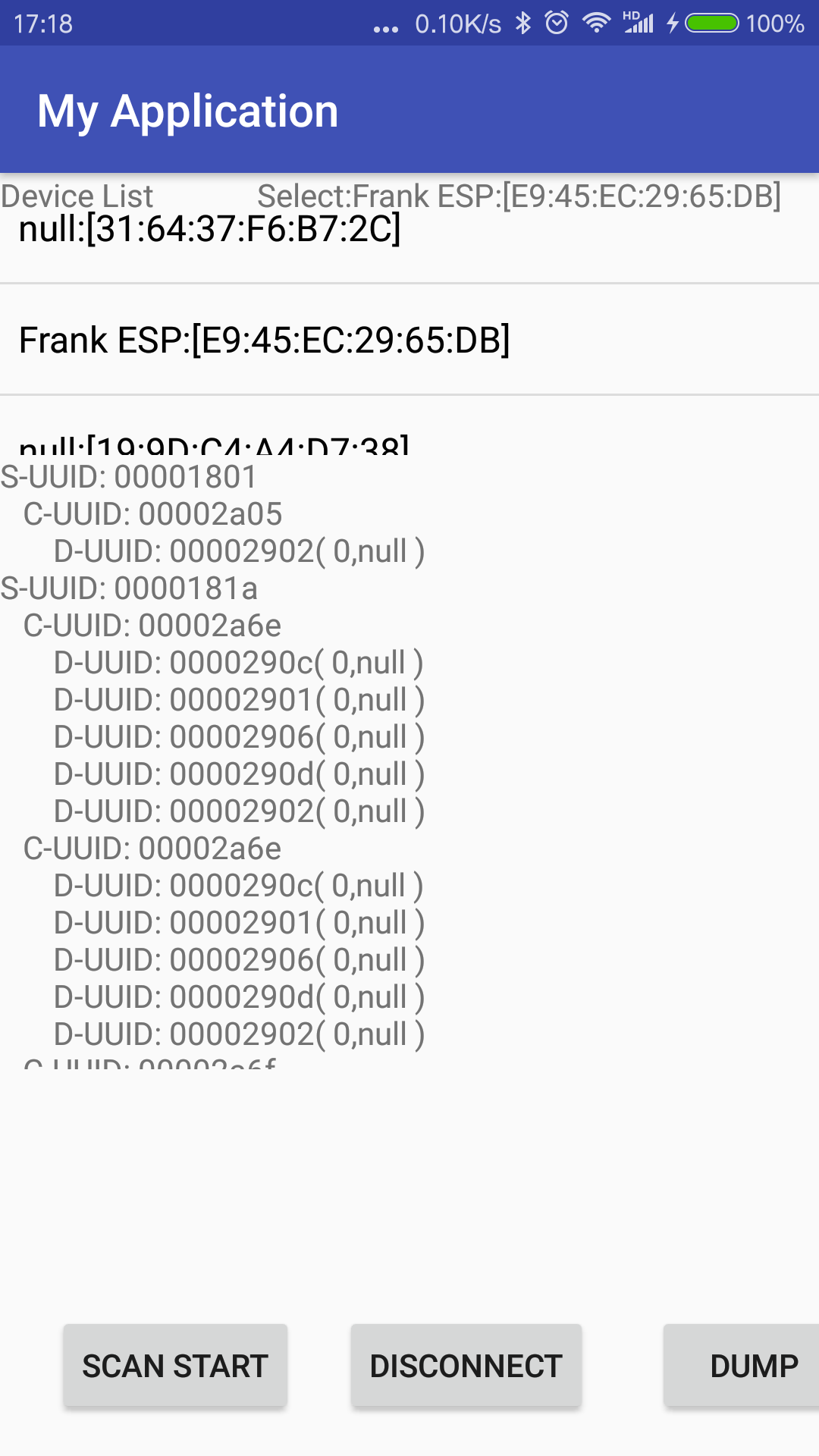
关闭连接 链接到标题
mGatt.close();
参考 链接到标题
https://developer.android.com/guide/topics/connectivity/bluetooth-le#connect