如何使用Zephyr文件系统
本文通过使用fs shell和分析fs shell命令的实现来说明输入使用Zephyr文件系统接口。
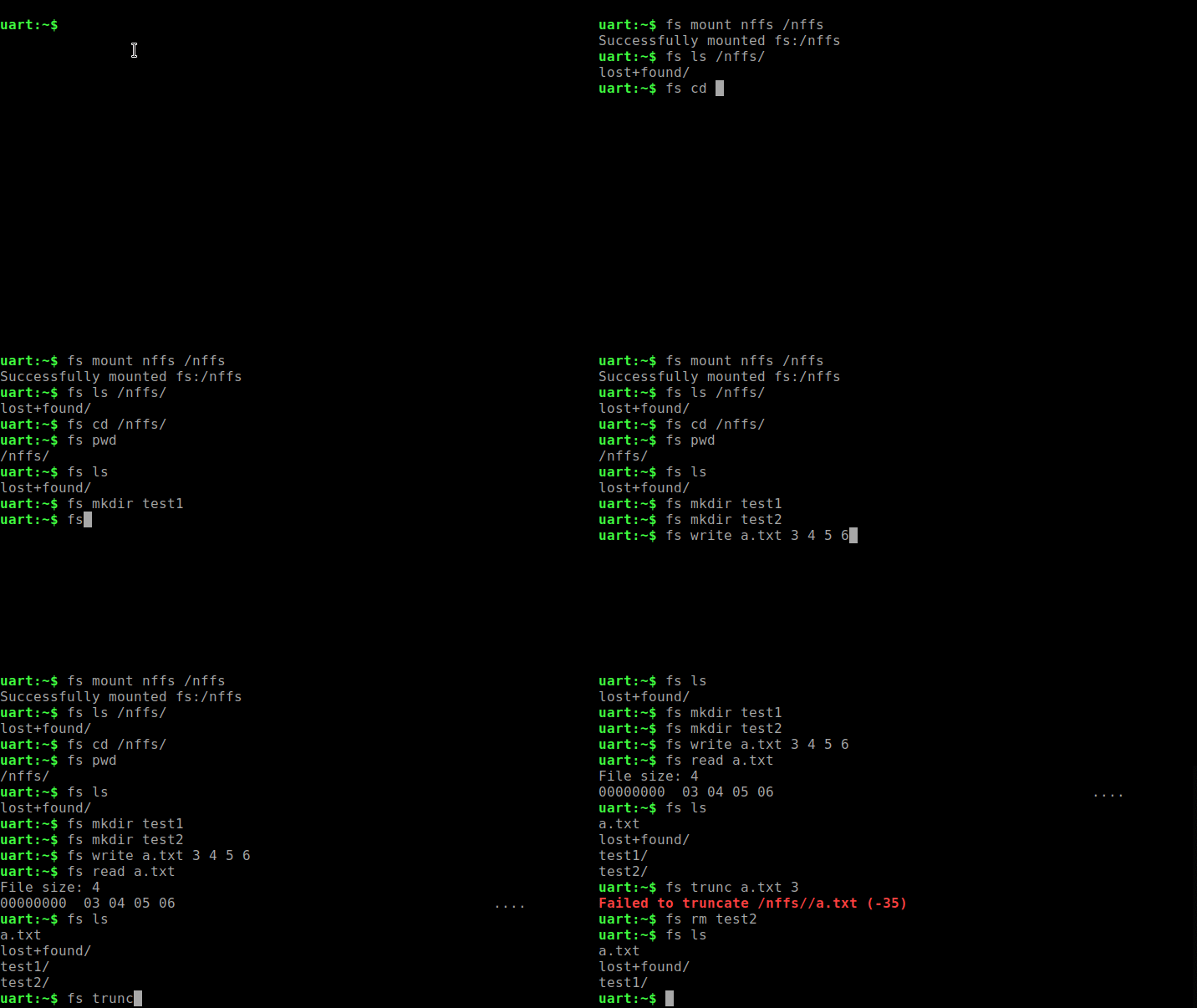
FS Shell命令使用 链接到标题
以nffs为例
fs mount nffs /nffs
fs ls /nffs/
fs cd /nffs/
fs pwd
fs mkdir test1
fs mkdir test2
fs write a.txt 3 4 5 6
fs read a.txt
fs ls
fs trunc a.txt 3
fs read a.txt
fs rm test2
fs ls
演示如下:
FS Shell命令实现 链接到标题
这里以nffs为例简单分析一下fs提供的shell命令,其它的app要想使用fs完全可以参考fs shell的命令来写。 前面的分析知道fs的初始化代码无需再app中使用,在系统初始化时会被自动调用。直接看fs shell提供的命令。同时这里只介绍fs shell如何使用fs api来构建功能,fs shell 的相对路径/绝对路径/当前路径的管理是在shell.c中实现,可以参看代码,这里不详细做介绍。
mount 链接到标题
mount是将fs和要mount点路径建立联系,之后的fs操作都基于mount点进行
static int cmd_mount_nffs(const struct shell *shell, size_t argc, char **argv)
{
    // nffs mount点,可以指定未使用的例如/nffs
	nffs_mnt.mnt_point = (const char *)mntpt;
    // nffs操作的flash
	flash_dev = device_get_binding(CONFIG_FS_NFFS_FLASH_DEV_NAME);
	nffs_mnt.storage_dev = flash_dev;
    //mount
	res = fs_mount(&nffs_mnt);

	return 0;
}
cd 链接到标题
cd命令是进入某个路径文件夹,实际实现上只是用fs_stat检查该路径是否是文件夹 static int cmd_cd(const struct shell *shell, size_t argc, char **argv) { //读取指定路径文件状态 err = fs_stat(path, &entry); //判断是否为文件夹 if (entry.type != FS_DIR_ENTRY_DIR) { shell_error(shell, “%s is not a directory”, path); return -ENOEXEC; }
//将当期路径存储起来
strcpy(cwd, path);

return 0;
}
pwd 链接到标题
显示当前所在路径,并不涉及实际的fs操作,只是将cd命令保存的路径显示出来
static int cmd_pwd(const struct shell *shell, size_t argc, char **argv)
{
	shell_print(shell, "%s", cwd);

	return 0;
}
ls 链接到标题
ls列出当前或者指定文件夹下的内容,其实现涉及文件夹操作相关函数 static int cmd_ls(const struct shell *shell, size_t argc, char **argv) { 开启要ls的文件夹路径 err = fs_opendir(&dir, path);
//遍历文件夹
while (1) {
	struct fs_dirent entry;

    //读取文件夹
	err = fs_readdir(&dir, &entry);
	if (err) {
		shell_error(shell, "Unable to read directory");
		break;
	}

	/* Check for end of directory listing */
	if (entry.name[0] == '\0') {
		break;
	}

	shell_print(shell, "%s%s", entry.name,
		      (entry.type == FS_DIR_ENTRY_DIR) ? "/" : "");
}

//关闭文件夹
fs_closedir(&dir);

return 0;
}
mkdir 链接到标题
创建指定文件夹,直接使用fs_mkdir即可
static int cmd_mkdir(const struct shell *shell, size_t argc, char **argv)
{
	err = fs_mkdir(path);
}
write 链接到标题
写文件,基本就是fs_open/fs_seek/fs_write/fs_close搭配使用
static int cmd_write(const struct shell *shell, size_t argc, char **argv)
{
    //open文件
	err = fs_open(&file, path);

    //seek到指定位置
	if (offset < 0) {
		err = fs_seek(&file, 0, FS_SEEK_END);
	} else {
		err = fs_seek(&file, offset, FS_SEEK_SET);
	}


	buf_len = 0U;
	while (arg_offset < argc) {
		buf[buf_len++] = strtol(argv[arg_offset++], NULL, 16);

		if ((buf_len == BUF_CNT) || (arg_offset == argc)) {
            //写文件
			err = fs_write(&file, buf, buf_len);
			if (err < 0) {
				shell_error(shell, "Failed to write %s (%d)",
					      path, err);
				fs_close(&file);
				return -ENOEXEC;
			}

			buf_len = 0U;
		}
	}
    //关闭文件
	fs_close(&file);

	return 0;
}
read 链接到标题
读文件,是fs_open/fs_seek/fs_read/fs_close搭配使用
static int cmd_read(const struct shell *shell, size_t argc, char **argv)
{
    //打开文件
	err = fs_open(&file, path);


	if (offset > 0) {
        //seek到要读取的位置
		err = fs_seek(&file, offset, FS_SEEK_SET);
		if (err) {
			shell_error(shell, "Failed to seek %s (%d)",
				    path, err);
			fs_close(&file);
			return -ENOEXEC;
		}
	}

	while (count > 0) {
		ssize_t read;
		u8_t buf[16];
		int i;
        //读取文件
		read = fs_read(&file, buf, MIN(count, sizeof(buf)));
		if (read <= 0) {
			break;
		}

		shell_fprintf(shell, SHELL_NORMAL, "%08X  ", offset);

		for (i = 0; i < read; i++) {
			shell_fprintf(shell, SHELL_NORMAL, "%02X ", buf[i]);
		}
		for (; i < sizeof(buf); i++) {
			shell_fprintf(shell, SHELL_NORMAL, "   ");
		}
		i = sizeof(buf) - i;
		shell_fprintf(shell, SHELL_NORMAL, "%*c", i*3, ' ');

		for (i = 0; i < read; i++) {
			shell_fprintf(shell, SHELL_NORMAL, "%c", buf[i] < 32 ||
				      buf[i] > 127 ? '.' : buf[i]);
		}

		shell_print(shell, "");

		offset += read;
		count -= read;
	}

     //关闭文件
	fs_close(&file);

	return 0;
}
rm 链接到标题
删除指定文件或文件夹,直接使用fs_unlink即可
static int cmd_rm(const struct shell *shell, size_t argc, char **argv)
{

	err = fs_unlink(path);
	if (err) {
		shell_error(shell, "Failed to remove %s (%d)", path, err);
		err = -ENOEXEC;
	}

	return err;
}
trunc 链接到标题
将文件剪裁到指定长度,是fs_open/fs_truncate/fs_close搭配使用
static int cmd_trunc(const struct shell *shell, size_t argc, char **argv)
{
    //开启文件
	err = fs_open(&file, path);

    //进行剪裁
	err = fs_truncate(&file, length);

    //关闭文件
	fs_close(&file);

	return err;
}
对于nffs来说目前不支援truncate,可以看nffs_fs.c的实现
static int nffs_truncate(struct fs_file_t *zfp, off_t length)
{
	/*
	 * FIXME:
	 * There is no API in NFFS to truncate opened file. For now we return
	 * ENOTSUP, but this should be revisited if truncation is implemented
	 * in NFFS at some point.
	 */

	return -ENOTSUP;
}