Zephyr使用mcuboot
本文说明在zephyr下如何使用mcuboot.
基于nrf52_moderate硬件演示说明mcuboot和zephyr的搭配使用,用mcuboot引导zephyr应用image。其它硬件平台的配置方法大致相同,只用重新规划flash partition即可。
修改flash partition 链接到标题
修改nrf52_moderate/boards/arm/nrf52_moderate/nrf52_moderate.dts中flash partition
	chosen {
		zephyr,console = &uart0;
		zephyr,uart-mcumgr = &uart0;
		zephyr,shell-uart = &uart0;
		zephyr,sram = &sram0;
		zephyr,flash = &flash0;
		zephyr,code-partition = &slot0_partition;
	};

&flash0 {
	/*
	 * For more information, see:
	 * http://docs.zephyrproject.org/latest/devices/dts/flash_partitions.html
	 */
	partitions {
		compatible = "fixed-partitions";
		#address-cells = <1>;
		#size-cells = <1>;

		boot_partition: partition@0 {
			label = "mcuboot";
			reg = <0x00000000 0xc000>;
		};
		slot0_partition: partition@c000 {
			label = "image-0";
			reg = <0x0000C000 0x32000>;
		};
		slot1_partition: partition@3e000 {
			label = "image-1";
			reg = <0x0003E000 0x32000>;
		};
		scratch_partition: partition@70000 {
			label = "image-scratch";
			reg = <0x00070000 0xa000>;
		};
		storage_partition: partition@7a000 {
			label = "storage";
			reg = <0x0007a000 0x00006000>;
		};
	};
};
以上dts表示: boot_partition: 存放mcuboot,起始地址0x00000000,大小0xc000 slot0_partition: mcuboot从该分区加载执行应用镜像,起始地址0x0000C000,大小0x32000 slot1_partition: 保存zephyr dfu将接收到的应用镜像,起始地址0x0003E000,大小0x32000 scratch_partition: mcuboot交换slot0和slot1时的临时存储区,起始地址0x00070000,大小0xa000
编译和烧写 链接到标题
准备好nrf52_moderate通过daplink连到电脑上
编译烧写mcuboot 链接到标题
按照下面步骤进行mcuboot编译和写入
cd ~/project/zephyrproject
git clone https://github.com/JuulLabs-OSS/mcuboot.git
cd mcuboot/
pip3 install --user -r scripts/requirements.txt
cd boot/zephyr
mkdir build
cd build
cmake -DBOARD=nrf52_moderate -DBOARD_ROOT=/home/frank/work/project/nrf52_moderate ..
make -j
make flash
只有mcuboot没有应用镜像的启动情况如下

编译烧写应用镜像 链接到标题
配置 链接到标题
应用镜像代码参考smp_svr,主要是关心其prj.conf中的
CONFIG_BOOTLOADER_MCUBOOT=y
一个应用只要配置了CONFIG_BOOTLOADER_MCUBOOT=y,其text段会被指定到slot0_partition的起始地址0xc000,可以通过readelf检查编译出来的elf
Section Headers:
  [Nr] Name              Type            Addr     Off    Size   ES Flg Lk Inf Al
  [ 0]                   NULL            00000000 000000 000000 00      0   0  0
  [ 1] text              PROGBITS        0000c000 0000c0 0002dc 00 WAX  0   0  4
  [ 2] _TEXT_SECTION_NAM PROGBITS        0000c2e0 0003a0 00f49e 00  AX  0   0  8
编译 链接到标题
编译方法没变
cd ~/work/project/nrf52_moderate/apps/smp_svr/build
cmake -DBOARD=nrf52_moderate -DBOARD_ROOT=/home/frank/work/project/nrf52_moderate ..
make -j
签名 链接到标题
编译出来的镜像要用mcuboot提供的工具签名
~/work/project/zephyrproject/mcuboot/scripts/imgtool.py sign --key ~/work/project/zephyrproject/mcuboot/root-rsa-2048.pem --header-size 0x200 --align 8 --version 1.0 --slot-size 0x32000 ./zephyr/zephyr.bin zephyr.signed.bin
烧写 链接到标题
将签名后的image烧写到slot0_partition的起始地址
pyocd-flashtool -t nrf52 -a 0xC000 zephyr.signed.bin
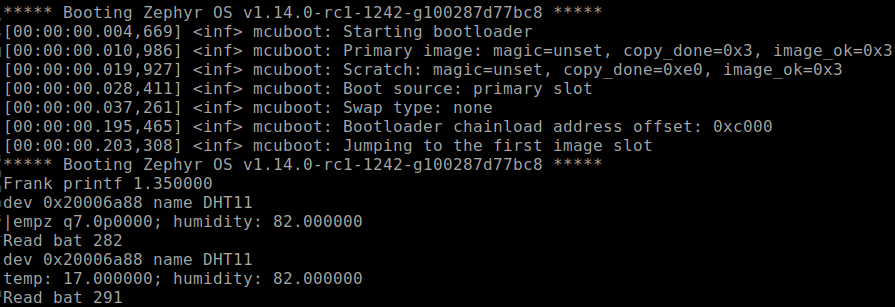
重启nrf52_moderate,就可以看到mcuboot引导启动应用镜像
mcuboot启动流程说明 链接到标题
device上电后从0x00000000开始执行mcuboot,mcuboot检查slot0_partition通过后,从slot0_partition执行应用镜像。所有要执行应用镜像只能放到slot0_partition。zephyr dfu下载的镜像被放在slot1_partition,当要执行新下载的应用镜像时, mcuboot会将slot0和slot1进行swap,然后还是从slot0执行新的镜像。因此slot0和slot1的大小必须一致。
其它问题 链接到标题
Q: 如果想编译出来的镜像直接执行而不是通过mcuboot引导是否还需要将dts修改回去? A: 不需要,不配置CONFIG_BOOTLOADER_MCUBOOT即可,只有当CONFIG_BOOTLOADER_MCUBOOT=y时text段才会被指定到code-partition, 未配置时text还是在0x00000000 Q: 被下载到slot1的image是否需要改dts为zephyr,code-partition = &slot1_partition? A: 不需要,因为mcuboot要执行slot1的镜像,会先将slot1和slot0做swap,然后从slot0执行
参考 链接到标题
https://mcuboot.com/mcuboot/readme-zephyr.html https://docs.zephyrproject.org/latest/guides/dts/index.html#mcuboot-partitions https://docs.zephyrproject.org/latest/guides/device_mgmt/dfu.html