Zephyr调试器配置及原理
本文在ubuntu下以pyocd为例说明Zephyr如何配置调试器,及其实现的原理。
调试器简介 链接到标题
为了方便理解,先画一个完整的调试环境如下图:
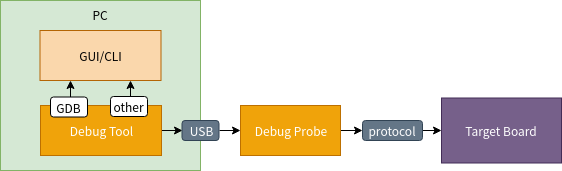 硬件上:PC通过USB连接调试器(Debug Probe), 调试器通过调试电缆连接被调试的目标板(Target Board)
软件上:PC上的调试工具(Debug tool)通过USB HID控制调试器,调试器通过调试协议(JTAG/SWD)调试目标板。PC上的前端工具(GUI/CLI)通过gdb或者其它协议控制debug tool调试和查看数据。debug tool相当于是调试器的一个软件代理。下面列举各个部分常见的一些工具
GUI: VS Code,Eclipse,CodeBlock,ddd
CLI: GDB, tui
Debug Tool: pyocd, openocd
Debug Probe : Daplink, J-link, st-link, OpenJtag
protocol: JTAG, SWD
一些工具会将GUI/CLI会和Debug Tool集成在一起,例如keil, ozoen
硬件上:PC通过USB连接调试器(Debug Probe), 调试器通过调试电缆连接被调试的目标板(Target Board)
软件上:PC上的调试工具(Debug tool)通过USB HID控制调试器,调试器通过调试协议(JTAG/SWD)调试目标板。PC上的前端工具(GUI/CLI)通过gdb或者其它协议控制debug tool调试和查看数据。debug tool相当于是调试器的一个软件代理。下面列举各个部分常见的一些工具
GUI: VS Code,Eclipse,CodeBlock,ddd
CLI: GDB, tui
Debug Tool: pyocd, openocd
Debug Probe : Daplink, J-link, st-link, OpenJtag
protocol: JTAG, SWD
一些工具会将GUI/CLI会和Debug Tool集成在一起,例如keil, ozoen
对于Zephyr来说是面向Debug Tool的设置,在Zephyr中用的Debug tool名字是和系统的可执行档名有关
配置 链接到标题
使用说明 链接到标题
zephyr中默认debug tool和board是绑定的,因此对于debug tool的配置是放在board下面的board.cmake
board_set_debugger_ifnset(pyocd)                                                //调试使用pyocd
board_set_flasher_ifnset(pyocd)                                                     //刷flash使用pyocd
board_runner_args(pyocd "--target=mimxrt1050_hyperflash")           // 设置pyocd的运行参数
include(${ZEPHYR_BASE}/boards/common/pyocd.board.cmake)      //调试器默认使用pyocd
通过上面配置可以指定对应的board调试使用pyocd,连接的DAPLink目标是mimxrt1050_hyperflash
配置宏/函数 链接到标题
在zephyr/cmake/extensions.cmake中提供了下面的函数和宏供外部使用,作用如下
function(board_set_runner type runner)                    //设置调试器/烧写器
macro(board_set_runner_ifnset type runner)          //如果之前没有设置调试器/烧写器,则设置调试器/烧写器
macro(board_set_flasher runner)                                   //设置烧写器
macro(board_set_debugger runner)                             //设置调试器
macro(board_set_flasher_ifnset runner)                      //如果之前没有设置调试器,则设置调试器
macro(board_set_debugger_ifnset runner)                 //如果之前没有设置烧写器,则设置烧写器
function(board_runner_args runner)                              //设置调试器/烧写器运行参数
function(board_finalize_runner_args runner)             //设置调试器/烧写器运行默认参数,该参数在没有board runner和args时使用
原理 链接到标题
配置宏/函数的实现 链接到标题
关于调试器配置总共3个函数(红色)和5个宏,关系和作用如下图
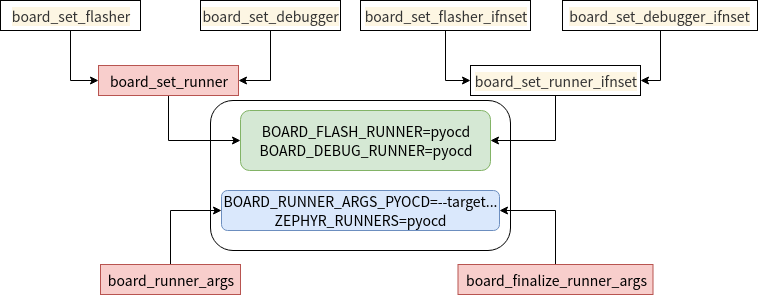 可以看到这组被board.cmake调用的宏和函数,最后是生成了2个变量:
BOARD_FLASH_RUNNER=pyocd
BOARD_DEBUG_RUNNER=pyocd
2个属性
BOARD_RUNNER_ARGS_PYOCD="–target=mimxrt1050_hyperflash"
ZEPHYR_RUNNERS=pyocd
可以看到这组被board.cmake调用的宏和函数,最后是生成了2个变量:
BOARD_FLASH_RUNNER=pyocd
BOARD_DEBUG_RUNNER=pyocd
2个属性
BOARD_RUNNER_ARGS_PYOCD="–target=mimxrt1050_hyperflash"
ZEPHYR_RUNNERS=pyocd
Zephyr cmake公共变量 链接到标题
在zephyr/cmake/flash/CMakeLists.txt中以上2个变量和2个属性被变为zephyr公共的变量
#转zephyr公共变量
if(BOARD_FLASH_RUNNER)
  set(ZEPHYR_BOARD_FLASH_RUNNER ${BOARD_FLASH_RUNNER} CACHE STRING
    "Default runner for flashing binaries" FORCE)
endif()
if(BOARD_DEBUG_RUNNER)
  set(ZEPHYR_BOARD_DEBUG_RUNNER ${BOARD_DEBUG_RUNNER} CACHE STRING
    "Default runner for debugging" FORCE)
endif()

#属性转为zephyr公共变量
get_property(RUNNERS GLOBAL PROPERTY ZEPHYR_RUNNERS)
if(RUNNERS)
  set(ZEPHYR_RUNNERS ${RUNNERS} CACHE INTERNAL "Available runners")
  foreach(runner ${RUNNERS})
    string(MAKE_C_IDENTIFIER ${runner} runner_id)
    # E.g. args = BOARD_RUNNER_ARGS_openocd, BOARD_RUNNER_ARGS_dfu_util, etc.
    get_property(runner_args GLOBAL PROPERTY "BOARD_RUNNER_ARGS_${runner_id}")
    set(ZEPHYR_RUNNER_ARGS_${runner_id} ${runner_args} CACHE STRING
      "Runner-specific arguments for ${runner}" FORCE)
  endforeach()
最后得到4个变量 ZEPHYR_BOARD_FLASH_RUNNER=pyocd ZEPHYR_BOARD_DEBUG_RUNNER=pyocd ZEPHYR_RUNNER_ARGS_PYOCD="–target=mimxrt1050_hyperflash" ZEPHYR_RUNNERS=pyocd
west调用 链接到标题
有了配置好Zephyr公共变量,我们再来看west如何调用。west工具读取zephyr/scripts/west-commands.yml,可以获取flash和debug命令,在执行这west flash和west debug(deuggerserver和attach类似,不再展开)两个命令的时候会分别调用flash.py和debug.py
  - file: scripts/west_commands/flash.py
    commands:
      - name: flash
        class: Flash
        help: flash and run a binary on a board
  - file: scripts/west_commands/debug.py
    commands:
      - name: debug
        class: Debug
        help: flash and interactively debug a Zephyr application
      - name: debugserver
        class: DebugServer
        help: connect to board and launch a debug server
      - name: attach
        class: Attach
        help: interactively debug a board
west flash呼叫zephyr/scripts/west_commands/flash.py Flash.do_run 读取ZEPHYR_BOARD_FLASH_RUNNER=pyocd
    def do_run(self, my_args, runner_args):
        do_run_common(self, my_args, runner_args,
                      'ZEPHYR_BOARD_FLASH_RUNNER')  //
west debug呼叫zephyr/scripts/west_commands/debug.py Debug.do_run读取ZEPHYR_BOARD_DEBUG_RUNNER=pyocd
def do_run(self, my_args, runner_args):
        do_run_common(self, my_args, runner_args,
                      'ZEPHYR_BOARD_DEBUG_RUNNER')
两者都是呼叫到zephyr/scripts/west_commands/run_common.py的do_run_common, 在do_run_common中读取ZEPHYR_RUNNER_ARGS_PYOCD获取board.cmake传入的参数
cached_runner_args = cache.get_list(
        'ZEPHYR_RUNNER_ARGS_{}'.format(cmake.make_c_identifier(runner)))        //board.cmake board_runner_args传入的参数
runner_args = [arg for arg in runner_args if arg != '--']       //west命令行传入的参数
final_runner_args = cached_runner_args + runner_args

//解析参数
parser = argparse.ArgumentParser(prog=runner)
runner_cls.add_parser(parser)
parsed_args, unknown = parser.parse_known_args(args=final_runner_args)

//创建调试器
 runner = runner_cls.create(cfg, parsed_args)

 //执行调试命令
 runner.run(command_name)
前面三个重要的函数:解析参数,创建调试器,执行调试命令 都来自于zephyr/scripts/west_commands/runners/core.py
add_parser->cls.do_add_parser(parser) -> do_add_parser抽象方法
create         抽象方法
run->self.do_run(command, **kwargs) -> do_run 抽象方法
这些抽象方法在pyocd的情况下被zephyr/scripts/west_commands/runners/pyocd.py实现: do_add_parser->parser.add_argument, 可在这里添加要解析的参数 create->PyOcdBinaryRunner,构造时使用do_add_parser内添加的参数 pyocd.py会根据不同的参数构造不同的cmd do_run->self.flash->self.check_call(cmd) –> 这里就会执行pyocd flash ….
        cmd = ([self.pyocd] +
               ['flash'] +
               ['-e', 'sector'] +
               self.flash_addr_args +
               self.daparg_args +
               self.target_args +
               self.board_args +
               self.frequency_args +
               self.flash_extra +
               [fname])
do_run-> self.debug_debugserver->self.check_call(cmd) –>这里就会执行pyocd gdbserver …
        server_cmd = ([self.pyocd] +
                      ['gdbserver'] +
                      self.daparg_args +
                      self.port_args() +
                      self.target_args +
                      self.board_args +
                      self.frequency_args)
实例 链接到标题
分析了这么多,其实就是为了在zephyr内pyocd加上尚未支援的参数,这里我是想的pyocd flash时指定–script参数,方便在添加不同的板子时在不修改pyocd的情况下通过脚本适配板子上的flash。从上面的分析看增加一个参数,其实就是: 在do_add_parser中增加parser的参数 在PyOcdBinaryRunner构造是添加增加的参数 在do_run执行命令时添加该参数 详细修改见: https://github.com/lgl88911/zephyr/commit/dab736910903bb81ea15571673a7b973652c30a2