Zephyr连入阿里云物联网平台--概览
本文概览zephyr使用aliyun SDK连入阿里云物联网平台。
概述 链接到标题
本系列文章说明如何将zephyr连入阿里云物联网平台,并上传设备所在的温湿度。预计共3篇:
- 概览: 简要说明系统组成,及运行演示
- 移植: 说明如果将aliyun C-SDK移植到zephyr上
- 使用: 说明如何基于aliyun C-SDK在zepyhr上将温湿度送到阿里云上
硬件 链接到标题
SOC: nrf52832(ARM-Cortex M4)
网络:enc28j60(RJ45 ethernet)
传感器:DHT11(温度&湿度)
实物图如下:
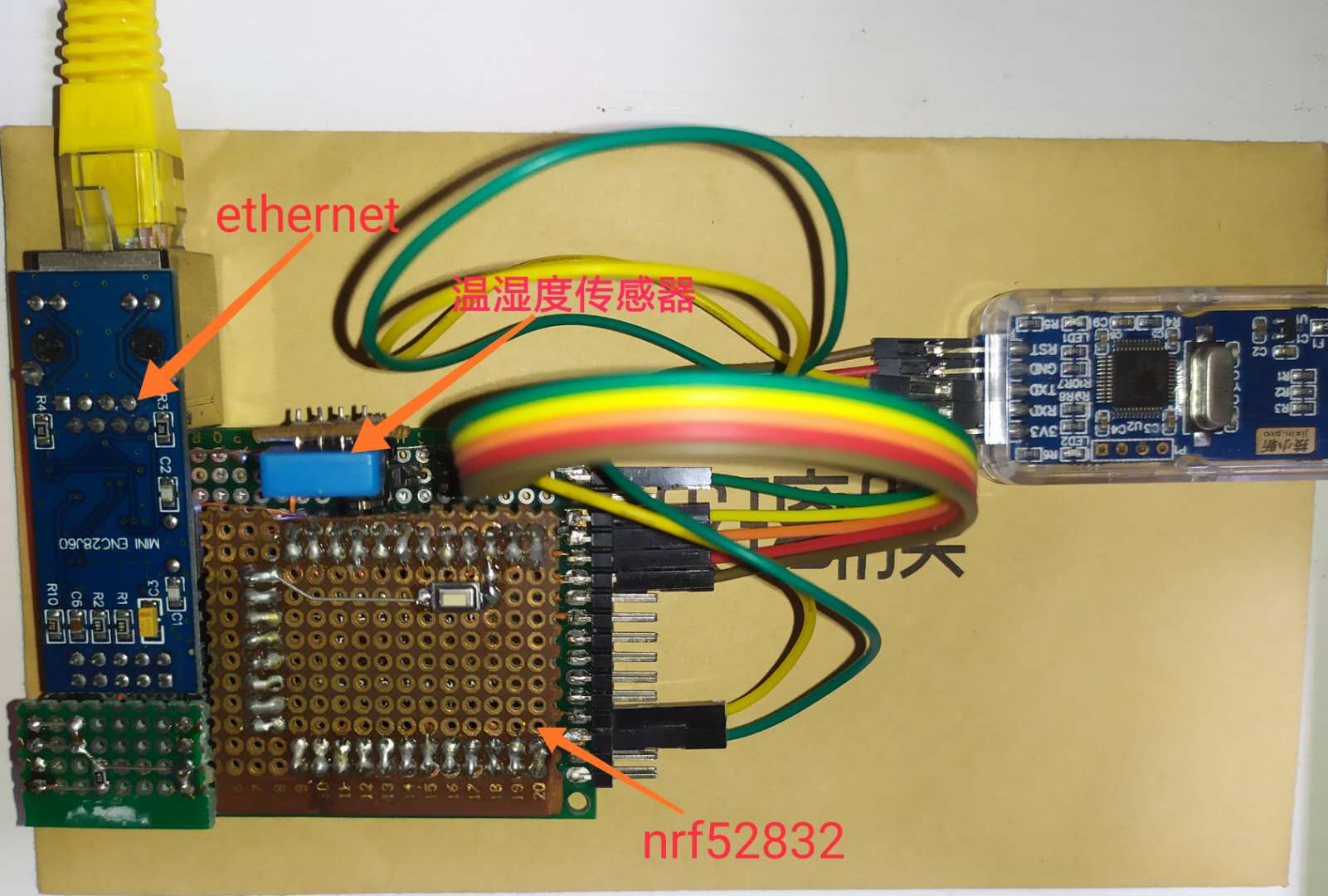 图中nrf52832是使用的最小系统模块
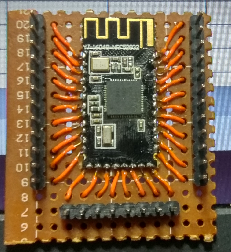 从硬件上看:nrf52832通过单总线协议从dht11获取温湿度,然后通过SPI外挂enc28j60将设备连接到以太网上
软件 链接到标题
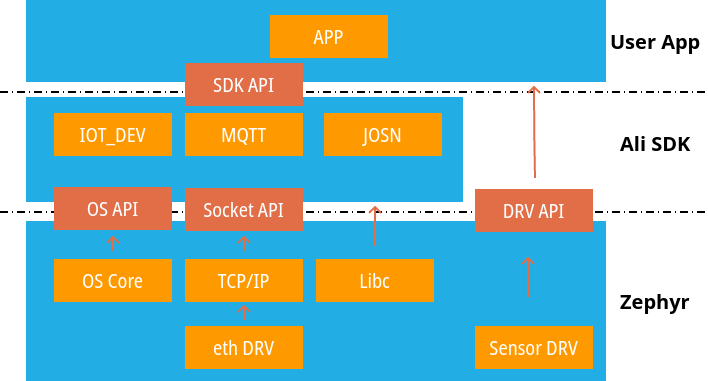
软件以zephyr系统提供socket/os/内存管理/设备驱动等基础设施; 移植ali-linkkit C-SDK实现了MQTT,设备认证,JSON解析等应用模块;应用使用设备驱动获取温度湿度,使用ali-linkkit C-SDK将温湿度发布到阿里云上。
软件架构如下图:
 ***为何不使用zephyr的MQTT:***zephyr也自带MQTT,这里没有使用是因为ali-linkkit SDK实现并使用了MQTT,直接使用SDK内的移植会更快速。当SDK无法满足应用需求时也可以安装ali-link的协议使用zephyr的MQTT来实现。
代码实例编译出来的信息如下,使用的代码量并不大:
***为何不使用zephyr的MQTT:***zephyr也自带MQTT,这里没有使用是因为ali-linkkit SDK实现并使用了MQTT,直接使用SDK内的移植会更快速。当SDK无法满足应用需求时也可以安装ali-link的协议使用zephyr的MQTT来实现。
代码实例编译出来的信息如下,使用的代码量并不大:
Memory region         Used Size  Region Size  %age Used
           FLASH:      186277 B       512 KB     35.53%
            SRAM:       40724 B        64 KB     62.14%
        IDT_LIST:         136 B         2 KB      6.64%
SDK和其中各部分的占比如下
eng                                                                21290    11.43%
  mqtt                                                             10254     5.50%
  dev_model                                                         2326     1.25%
  dev_sign                                                          1252     0.67%
  nfra                                                              6486     3.48%
  wrappers                                                           972     0.52%
连接图 链接到标题
下图是实验的连接图

- 使用光猫通过运营商连接到云端
- 家庭中央无线路由器通过有线连接光猫
- 开发用无线路由器桥接中央无线路由
- 传感器设备通过有线连接开发用无线路由器
演示 链接到标题
Device端 链接到标题
启动初始化log 链接到标题
uart:~$ ***** Booting Zephyr OS build zephyr-v1.14.0-2172-g3f057403cb43 *****
[00:00:00.010,955] <inf> eth_enc28j60: ENC28J60 Initialized
uart:~$ dev 0x20009c80 name DHT11
main|180 :: mqtt example
认证连接log 链接到标题
uart:~$
> {
>     "id": "0",
>     "version": "1.0",
>     "params": [
>         {
>             "attrKey": "SYS_LP_SDK_VERSION",
>             "attrValue": "3.0.1",
>             "domain": "SYSTEM"
>         },
>         {
>             "attrKey": "SYS_SDK_LANGUAGE",
>             "attrValue": "C",
>             "domain": "SYSTEM"
>         }
>     ],
>     "method": "thing.deviceinfo.update"
> }


> {
>     "id": "1",
>     "params": {
>         "version": "app-1.0.0-20180101.1000"
>     }
> }
发布数据log 链接到标题
example_publish|127 :: Topic /sys/a10Bd3AmDDC/4Z0Oeud7Sh4cod49oo2U/thing/event/property/post

example_publish|128 :: Payload {"id": 0,"params": {    "TargetTemperature": 26,    "Humidity": 33},"method": "thing.event.property.post"}


> {
>     "id":  0,
>     "params":  {
>             "TargetTemperature":  26,
>             "Humidity":  33
>     },
>     "method":  "thing.event.property.post"
> }

example_event_handle|143 :: msg->event_type : 9

< {
<     "code": 200,
<     "data": {
<     },
<     "id": "0",
<     "message": "success",
<     "method": "thing.deviceinfo.update",
<     "version": "1.0"
< }

example_event_handle|143 :: msg->event_type : 12
example_event_handle|143 :: msg->event_type : 9
example_event_handle|143 :: msg->event_type : 3

< {
<     "id":  0,
<     "params":  {
<             "TargetTemperature":  26,
<             "Humidity":  33
<     },
<     "method":  "thing.event.property.post"
< }

example_message_arrive|052 :: Message Arrived:
example_message_arrive|053 :: Topic  : /sys/a10Bd3AmDDC/4Z0Oeud7Sh4cod49oo2U/thing/event/property/post
example_message_arrive|054 :: Payload: {"id": 0,"params": {    "TargetTemperature": 26,    "Humidity": 33},"method": "thing.event.property.post"}
example_message_arrive|055 ::


< {
<     "code": 200,
<     "data": {
<     },
<     "id": "0",
<     "message": "success",
<     "method": "thing.event.property.post",
<     "version": "1.0"
< }

example_event_handle|143 :: msg->event_type : 12
example_event_handle|143 :: msg->event_type : 9
查看网络log 链接到标题
uart:~$ net iface

Interface 0x20009e40 (Ethernet) [1]
===================================
Link addr : 00:04:A3:15:1E:20
MTU       : 1500
Ethernet capabilities supported:
	10 Mbits
IPv4 unicast addresses (max 1):
	192.168.5.206 DHCP preferred
IPv4 multicast addresses (max 1):
	<none>
IPv4 gateway : 192.168.5.1
IPv4 netmask : 255.255.255.0
DHCPv4 lease time : 43200
DHCPv4 renew time : 21600
DHCPv4 server     : 192.168.5.1
DHCPv4 requested  : 192.168.5.206
DHCPv4 state      : bound
DHCPv4 attempts   : 1
uart:~$
uart:~$ net dns
DNS servers:
	192.168.5.1:53
Pending queries:
uart:~$ net
  allocs  arp     conn    dns     gptp    iface   ipv6    mem     nbr
  ping    route   stacks  stats   tcp     vlan
uart:~$ net conn
     Context   	Iface         Flags Local           	Remote
[ 1] 0x20000940	0x20009e40    4DU   0.0.0.0:45267	0.0.0.0:0
[ 2] 0x200009b8	0x20009e40    4ST   0.0.0.0:55591	106.15.83.29:1883

TCP        Context   Src port Dst port   Send-Seq   Send-Ack  MSS    State
0x200011a4 0x200009b8   55591     1883 1768210794 1944394490  1460   ESTABLISHED
云端 链接到标题
下图是在阿里云端看到的实时采集到我书房的温湿度
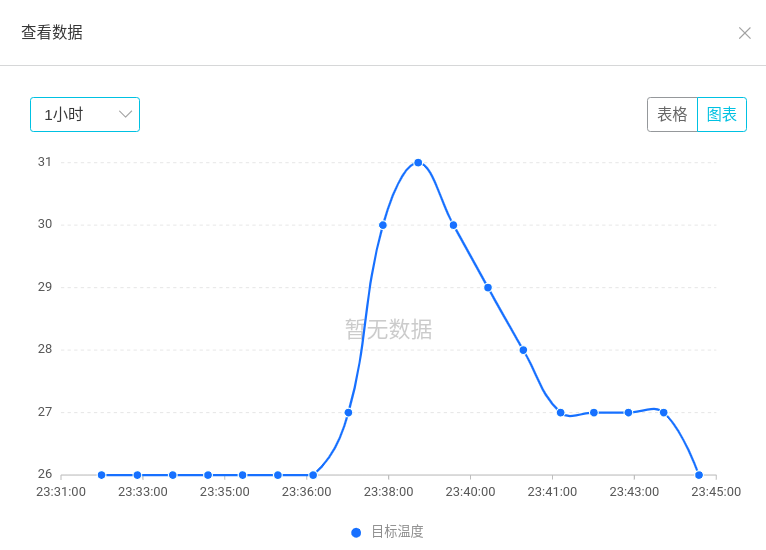
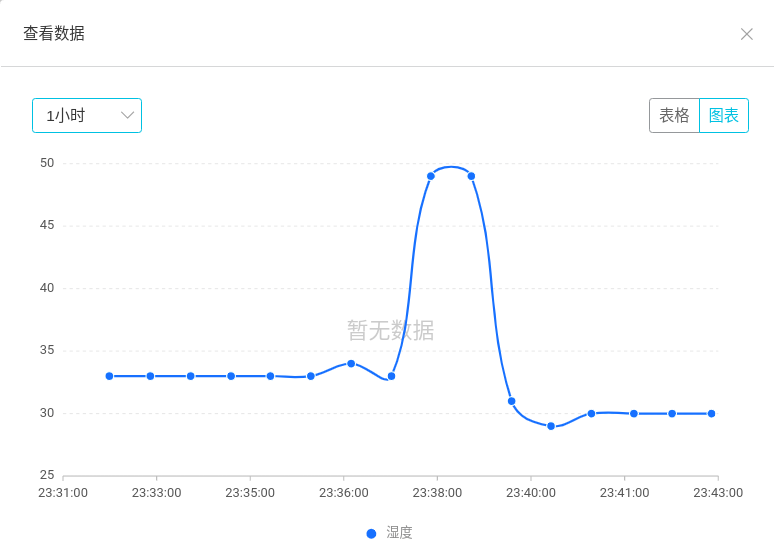
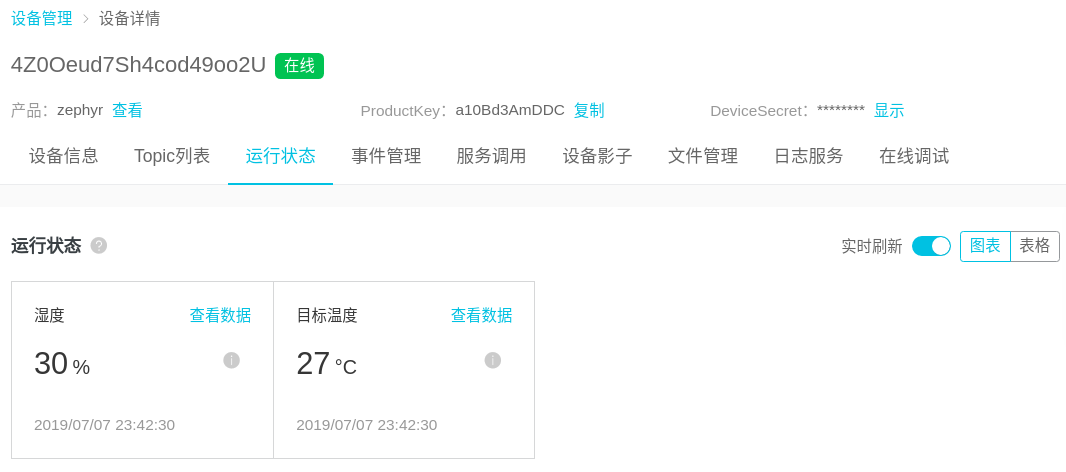 下图是统计一段时间内采集温度的情况, 会有一个变化是因为我用手捏了一会传感器,验证温湿度变化
 下图是统计一段时间内采集湿度的情况
本文到此结束(耗时3小时),如何移植请关注后续系列文章。