Zephyr RTOS Awareness配置
本文说明Zephyr RTOS Awareness的配置和使用,并演示VSCode中显示zephyr运行的各个thread。
概述 链接到标题
Zephyr提供rtos-awareness功能,可以将os的信息提供给调试器,在调试器中dump出各个thread,并切换查看信息。目前pyOCD v0.11.0及以后版本可以支援Zephyr rtos-awareness。Zepyhr官方文档是说明如何在eclipse下进行debug,我测试过在VSCode下也能正常识别出Zephyr各thread信息
升级pyocd 链接到标题
版本确认 链接到标题
查看当前pyocd版本
pyocd-tool --version
如果小于0.11.0则进行升级
依赖安装 链接到标题
我使用的是Ubuntu18.04,在升级过程中会遇到
No such file or directory: 'curl-config'
和
src/pycurl.h:164:13: fatal error: openssl/ssl.h
安装下面依赖即可
 sudo apt-get install libcurl4-openssl-dev
sudo apt-get install libssl-dev
升级pyocd 链接到标题
升级Pyocd前需要先升级pip,且都需要sudo权限
sudo -H pip install --upgrade pip -i https://pypi.tuna.tsinghua.edu.cn/simple pyspider
sudo -H pip install --pre -U pyocd -i https://pypi.tuna.tsinghua.edu.cn/simple pyspider
升级成功后,目前版本是0.11.2
关于pip国内镜像 链接到标题
直接使用pip非常慢,我升级的时候使用的是清华大学的Pip镜像,很快。下面给出几个其它的,没有测试过
清华:https://pypi.tuna.tsinghua.edu.cn/simple
阿里云:http://mirrors.aliyun.com/pypi/simple/
中国科技大学 https://pypi.mirrors.ustc.edu.cn/simple/
华中理工大学:http://pypi.hustunique.com/
山东理工大学:http://pypi.sdutlinux.org/
Zephyr配置 链接到标题
要开启rtos-awareness功能很方便,只用在你的应用的prj.conf中增加下面两个配置选项,然后重新编译即可
CONFIG_OPENOCD_SUPPORT=y
CONFIG_THREAD_MONITOR=y
VSCode运行 链接到标题
VSCode配置参考DAPLink-VSCode调试nrf52-moderate,无需再多添加任何配置选项,启动调试后在调用堆栈窗口中就可以看到所有的thread,并且可以点击切换,查看堆栈信息和变量信息。如下图:
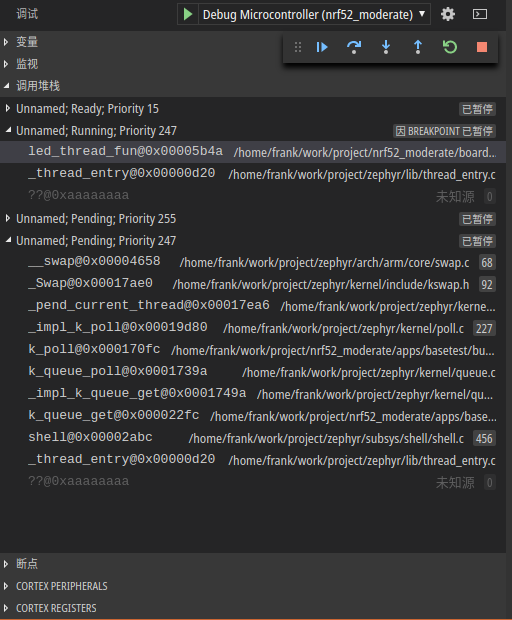
说明 就目前在VSCode的使用情况来看,在调用堆栈窗口中切换thread/frame并不好用,只有在*“因xxx已暂停”的thread上切换frame是正常的,在“已暂停”的thread/frame上点击会先闪现一下对应的frame再跳回到因xxx已暂停*的thread上。可能是VSCode的debug功能还有Bug吧。 目前通过控制台输出用gdb命令切换thread/frame还是很正常的
i thread        //显示所有thrad
t thread_id     //切换到对应thread
bt              //显示当前thread frame
f frame_id      //切换到对应frame
参考 链接到标题
http://docs.zephyrproject.org/application/application.html#rtos-awareness