基于Zephyr实现BLE Peripheral
本文以环境传感器为例说明如何使用zephyr gatt来实现一个BLE Peripheral
硬件 链接到标题
包含DHT11,可以测试温度和湿度
Spec 链接到标题
实现第一步先了解BLE环境传感器的spec,BLE中基于GATT的spec有4个层次:
- Profile: 配置文件:定义一个实际的应用场景,由一组Service组成
- Service:服务:由一组Characteristic组成
- Characteristic:有自己的读写Nodify属性, 并由一组Descriptor描述其它属性
- Descriptor:用于描述Characteristic的属性
Profile 链接到标题
读Profile找到要实现的service
环境传感器的profile是ESP:ENVIRONMENTAL SENSING PROFILE,找到包含的services
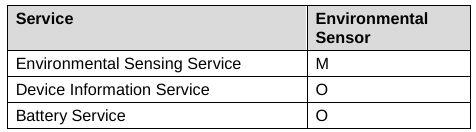 可以看到Environmental Sensing Service必须实现
Service 链接到标题
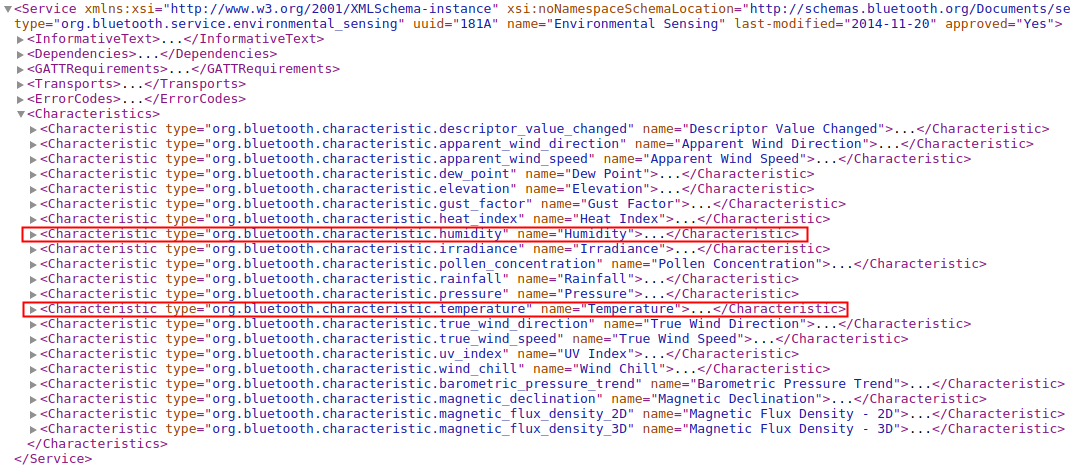
我们只实现Environmental Sensing Service,读ESS的spec,并下载 org.bluetooth.service.environmental_sensing可以得到如下信息:
Declare 链接到标题
推荐为Primary service

Characteristic 链接到标题
ESS可选的Characteristic有很多种,ESS spec要求至少实现一种(Page 10, Table 3.1),这里选择温度和湿度两种。
Descriptor 链接到标题
温度和湿度支援的描述,ESS spec未强制要求一定要实现


实现 链接到标题
一个Profile可以包含多个service,在Zephyr的实现中Profile是个逻辑概念,分别对Service进行定义即可。对于ESP我只实现了ESS,如下:
Profile:ESP
`-- Service:BT_UUID_ESS
    |-- Characteristic:BT_UUID_TEMPERATURE
    |   |-- Descriptor:BT_UUID_ES_MEASUREMENT
    |   |-- Descriptor:BT_UUID_GATT_CUD
    |   |-- Descriptor:BT_UUID_VALID_RANGE
    |   |-- Descriptor:BT_UUID_ES_TRIGGER_SETTING
    |   `-- Descriptor:BT_UUID_GATT_CCC
    `-- Characteristic:BT_UUID_HUMIDITY
        |-- Descriptor:BT_UUID_GATT_CCC
        `-- Descriptor:BT_UUID_GATT_CUD
Service定义 链接到标题
Service 链接到标题
下面代码是ess service的定义
//定义attr数组
static struct bt_gatt_attr ess_attrs[] = {
    /* Primary service declare */
	BT_GATT_PRIMARY_SERVICE(BT_UUID_ESS),       //声明Primary service

	/* Temperature Sensor*/
	BT_GATT_CHARACTERISTIC(BT_UUID_TEMPERATURE,
			       BT_GATT_CHRC_READ | BT_GATT_CHRC_NOTIFY,
			       BT_GATT_PERM_READ,
			       read_u16, NULL, &sensor_temp.temp_value),        //定义Temperature characteristic,提供温度
	BT_GATT_DESCRIPTOR(BT_UUID_ES_MEASUREMENT, BT_GATT_PERM_READ,
			   read_es_measurement, NULL, &sensor_temp.meas),   //Environmental Sensing Measurement Descriptor,提供温度传感器的测量参数,例如更新时间,测量精度等等
	BT_GATT_CUD(SENSOR_T_NAME, BT_GATT_PERM_READ),  //Characteristic User Description,用户自定义,这里用于提供传感器的名字
	BT_GATT_DESCRIPTOR(BT_UUID_VALID_RANGE, BT_GATT_PERM_READ,
			   read_temp_valid_range, NULL, &sensor_temp),  //Valid Range Descriptor传感器有效值范围
	BT_GATT_DESCRIPTOR(BT_UUID_ES_TRIGGER_SETTING,
			   BT_GATT_PERM_READ | BT_GATT_PERM_WRITE, read_temp_trigger_setting,
			   write_temp_trigger_setting, &sensor_temp),   // Environmental Sensing Trigger Setting Descriptor 设置和读区传感器触发方式,例如温度变化才nodify
	BT_GATT_CCC(sensor_temp.ccc_cfg, temp_ccc_cfg_changed), //Client Characteristic Configuration Descriptor, 配置Characteristic的描述符,例如可以配置让该Characteristic自动或者停止Nodify

	/* Humidity Sensor */
	BT_GATT_CHARACTERISTIC(BT_UUID_HUMIDITY, BT_GATT_CHRC_READ,
			       BT_GATT_PERM_READ,
			       read_u16, NULL, &sensor_hum.humid_value),    //湿度描述符
	BT_GATT_CUD(SENSOR_H_NAME, BT_GATT_PERM_READ),              //湿度传感器的名称
	BT_GATT_DESCRIPTOR(BT_UUID_ES_MEASUREMENT, BT_GATT_PERM_READ,
			   read_es_measurement, NULL, &sensor_hum.meas),    //湿度传感器的测量参数
};

//定义ess service
static struct bt_gatt_service ess_svc = BT_GATT_SERVICE(ess_attrs);
在BLE协议简述一文中说明了GATT Service就是一组Attribute组成,这些Attribute分为Declare/Characteristic/Descriptor,从上也可以看到确实是先定义了一个bt_gatt_attr数组,再以这个数组来定义service,从下面代码可以看到一个service就是存放了attr数组和attr的个数
#define BT_GATT_SERVICE(_attrs)						\
{									\
	.attrs = _attrs,						\
	.attr_count = ARRAY_SIZE(_attrs),				\
}

struct bt_gatt_service {
	/** Service Attributes */
	struct bt_gatt_attr	*attrs;
	/** Service Attribute count */
	size_t			attr_count;
	sys_snode_t		node;
};
Declare/Characteristic/Descriptor 链接到标题
将前面代码的几个宏展开,可以看到Declare/Characteristic/Descriptor最后都是Attr, Zephyr为方便使用将一些有共性的Descriptor进行重新封装,例如BT_GATT_CUD,BT_GATT_CCC
#define BT_GATT_PRIMARY_SERVICE(_service)				\
	BT_GATT_ATTRIBUTE(BT_UUID_GATT_PRIMARY, BT_GATT_PERM_READ,	\
			 bt_gatt_attr_read_service, NULL, _service)


#define BT_GATT_CHARACTERISTIC(_uuid, _props, _perm, _read, _write, _value) \
	BT_GATT_ATTRIBUTE(BT_UUID_GATT_CHRC, BT_GATT_PERM_READ,		\
			  bt_gatt_attr_read_chrc, NULL,			\
			  (&(struct bt_gatt_chrc) { .uuid = _uuid,	\
						   .properties = _props, })), \
	BT_GATT_ATTRIBUTE(_uuid, _perm, _read, _write, _value)

#define BT_GATT_DESCRIPTOR(_uuid, _perm, _read, _write, _value)		\
	BT_GATT_ATTRIBUTE(_uuid, _perm, _read, _write, _value)

#define BT_GATT_CUD(_value, _perm)					\
	BT_GATT_DESCRIPTOR(BT_UUID_GATT_CUD, _perm, bt_gatt_attr_read_cud, \
			   NULL, (void *)_value)

#define BT_GATT_CCC(_cfg, _cfg_changed)					\
	BT_GATT_ATTRIBUTE(BT_UUID_GATT_CCC,				\
			BT_GATT_PERM_READ | BT_GATT_PERM_WRITE,		\
			bt_gatt_attr_read_ccc, bt_gatt_attr_write_ccc,	\
			(&(struct _bt_gatt_ccc) { .cfg = _cfg,		\
					       .cfg_len = ARRAY_SIZE(_cfg), \
					       .cfg_changed = _cfg_changed, }))
Attribute 链接到标题
Service所有的元素最后都落脚于Attribute,这里也看下Attribute的定义
#define BT_GATT_ATTRIBUTE(_uuid, _perm, _read, _write, _value)		\
{									\
	.uuid = _uuid,							\
	.perm = _perm,							\
	.read = _read,							\
	.write = _write,						\
	.user_data = _value,						\
}

struct bt_gatt_attr {
	//UUID
	const struct bt_uuid	*uuid;
    //读回调,Central要求读对应Attr的时候会在Client调用该回调
	ssize_t			(*read)(struct bt_conn *conn,
					const struct bt_gatt_attr *attr,
					void *buf, u16_t len,
					u16_t offset);
    //写回调,Central要求写对应Attr的时候会在Client调用该回调
	ssize_t			(*write)(struct bt_conn *conn,
					 const struct bt_gatt_attr *attr,
					 const void *buf, u16_t len,
					 u16_t offset, u8_t flags);
    //用户自定义数据
	void			*user_data;
    //handle,由BLE Stack分配
	u16_t			handle;
    //ATTR权限,读/写/Nodify
	u8_t			perm;
};
启动BLE Serivce 链接到标题
static void bt_ready(int err)
{
	if (err) {
		printk("Bluetooth init failed (err %d)\n", err);
		return;
	}

	printk("Bluetooth initialized\n");
    //注册ess
    bt_gatt_service_register(&ess_svc);

    //启动client广播
	err = bt_le_adv_start(BT_LE_ADV_CONN_NAME, ad, ARRAY_SIZE(ad), NULL, 0);
	if (err) {
		printk("Advertising failed to start (err %d)\n", err);
		return;
	}

	printk("Advertising successfully started\n");
}

void esp_init(void)
{
	int err;
    //初始化时enable ble,ready后会调用bt_ready
	err = bt_enable(bt_ready);
	if (err) {
		printk("Bluetooth init failed (err %d)\n", err);
		return;
	}

	while (1) {
		k_sleep(MSEC_PER_SEC);
		//每秒poll一次温度和湿度
		ess_poll();
	}
}
GATT操作 链接到标题
CHARACTERISTIC读写 链接到标题
在使用宏BT_GATT_CHARACTERISTIC定义Characteristic时会将Read和Write的函数注册进入,当Central端进行读GATT时Peripheral调用Read函数,响应的Central端进行GATT写的时候就调用Write函数,例如
BT_GATT_CHARACTERISTIC(BT_UUID_TEMPERATURE,
	BT_GATT_CHRC_READ | BT_GATT_CHRC_NOTIFY,
	BT_GATT_PERM_READ,
	read_u16, NULL, &sensor_temp.temp_value)
只定义了读函数也就是支持gatt读温度,当Central需要读温度时,Peripheral主动调用该函数
static ssize_t read_u16(struct bt_conn *conn, const struct bt_gatt_attr *attr,
			void *buf, u16_t len, u16_t offset)
{
	const u16_t *u16 = attr->user_data;		//这里的user_data就是前面注册的sensor_temp.temp_value
	u16_t value = sys_cpu_to_le16(*u16);
	//通过gatt attr read将temp送到Central
	return bt_gatt_attr_read(conn, attr, buf, len, offset, &value,
				 sizeof(value));
}
写类似,本文可参考Descriptor的写
Descriptor读写 链接到标题
在使用宏BT_GATT_DESCRIPTOR定义Descriptor时会将Read和Write的函数注册进入,当Central端进行读GATT时Peripheral调用Read函数,响应的Central端进行GATT写的时候就调用Write函数,例如
BT_GATT_DESCRIPTOR(BT_UUID_ES_TRIGGER_SETTING,
			   BT_GATT_PERM_READ | BT_GATT_PERM_WRITE, read_temp_trigger_setting,
			   write_temp_trigger_setting, &sensor_temp)
上面的read_temp_trigger_setting和write_temp_trigger_setting分别用于读取和设置温度传感器的触发方式
特殊Descriptor操作 链接到标题
对于一些特殊的Descriptor操作是固定的,所以读写函数Zephyr已经帮我们将其写好了,只用在定义的时候给出Value即可例如
#define BT_GATT_CUD(_value, _perm)
也有一些Descriptor操作是特定的,Zephyr将其操作接口抽象出来由用户实现既可以,例如:
#define BT_GATT_CCC(_cfg, _cfg_changed)
传感器Poll 链接到标题
在主thread中每1s poll一次温湿度
static void ess_poll(void)
{
	static u8_t i;
	u16_t val;

	//定期fetch温湿度
	if (!(i % SENSOR_UPDATE_IVAL)) {
		struct sensor_value temp, humidity;
		struct device *dev = device_get_binding("DHT11");
		sensor_sample_fetch(dev);								  //从dh11读取数据
		sensor_channel_get(dev, SENSOR_CHAN_AMBIENT_TEMP, &temp); //读取温度
		sensor_channel_get(dev, SENSOR_CHAN_HUMIDITY, &humidity); //读取湿度
		val = temp.val1*100 + temp.val2/10000;
		//将温湿度保存在user_data中,供gatt读取
		update_temperature(NULL, &ess_attrs[2], val, &sensor_temp);
		sensor_hum.humid_value = humidity.val1*100 + humidity.val2/10000;
	}

	if (!(i % INT8_MAX)) {
		i = 0;
	}

	i++;
}
演示 链接到标题
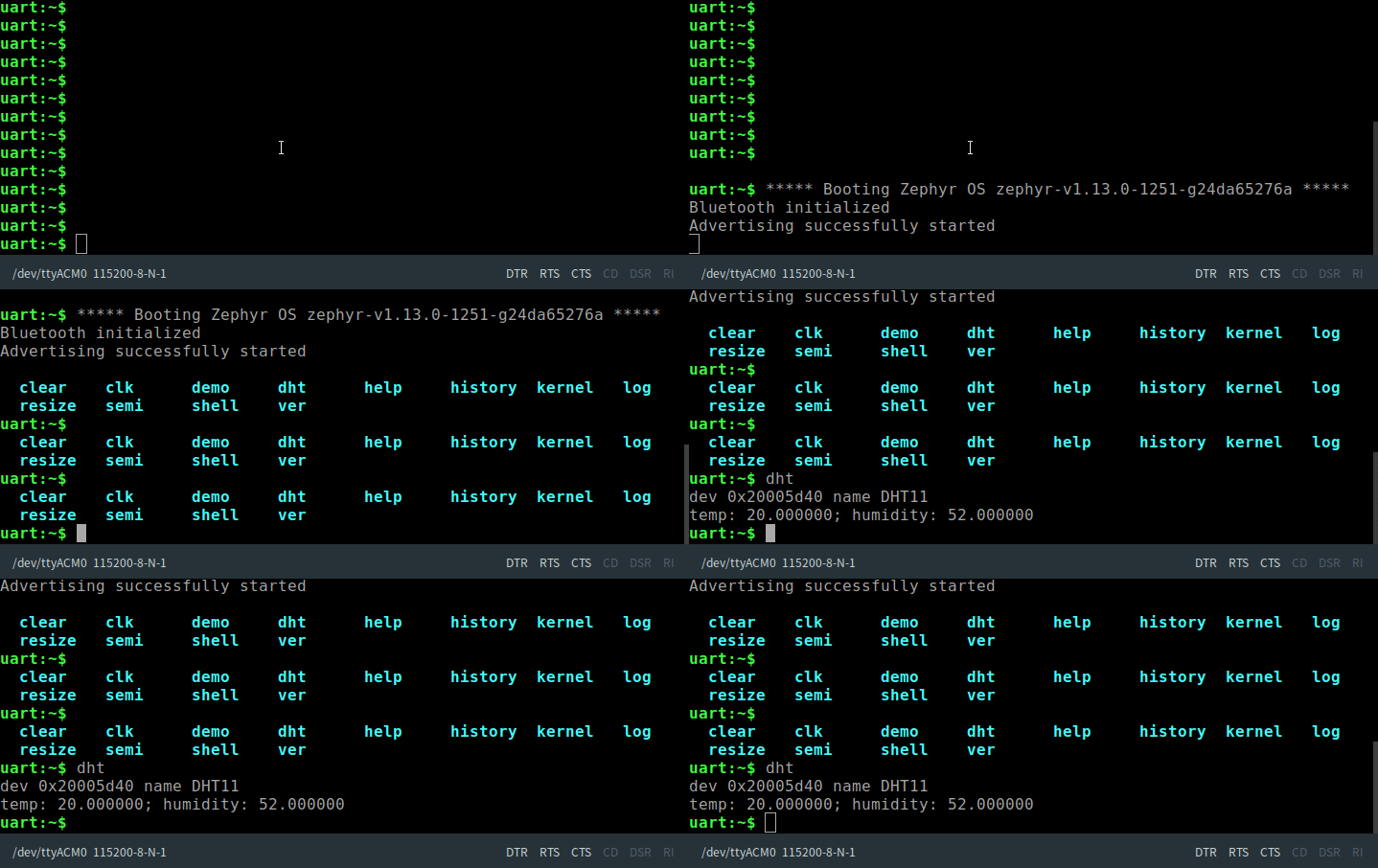
终端上直接看温度和湿度
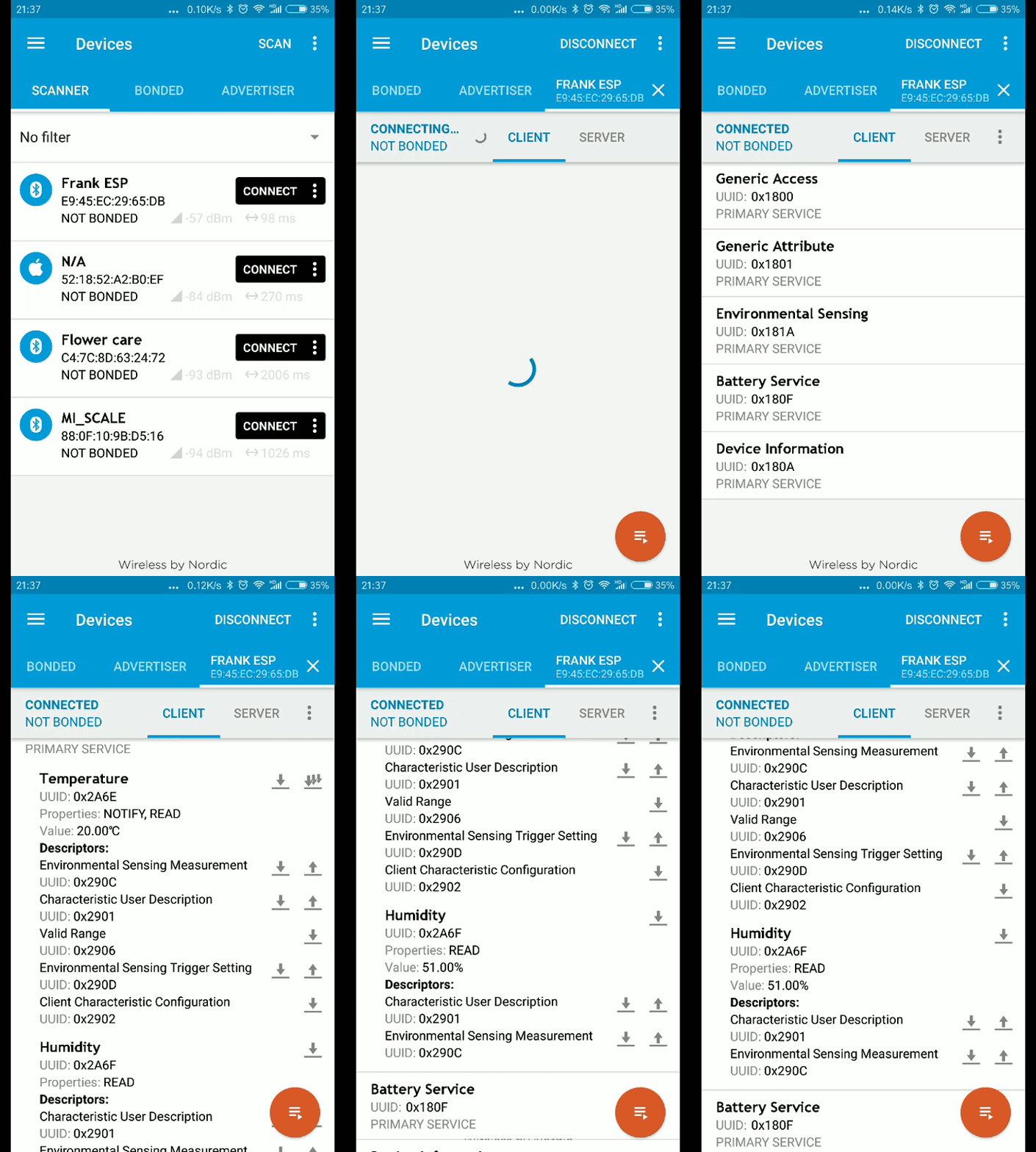
 通过手机蓝牙看温度和湿度
参考 链接到标题
https://docs.zephyrproject.org/latest/samples/bluetooth/peripheral_esp/README.html https://www.bluetooth.com/specifications/gatt